About WSE Digital Classroom
We know that your time is precious. Now you never need to miss a class again. With the Wall Street English Digital Classroom, you can join your Encounter from anywhere. Next time you travel or cannot make it to your...
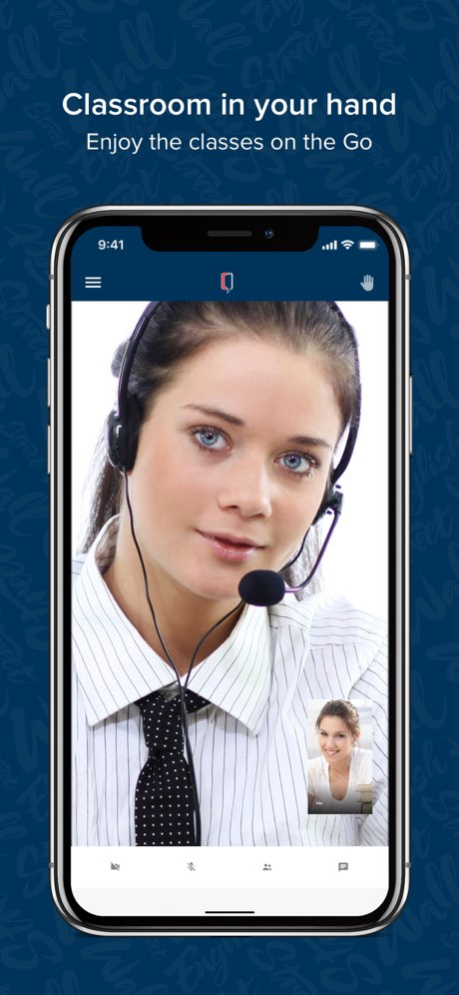
We know that your time is precious. Now you never need to miss a class again. With the Wall Street English Digital Classroom, you can join your Encounter from anywhere. Next time you travel or cannot make it to your center, just book your activity online and connect with your Teacher and fellow students. As always we will continue to support you in your success. With the Digital Classroom you can now: Speak more! Improve your conversation skills by video chatting with your classmates and Teacher. Have more teacher time. With small classes, you are guaranteed plenty of attention from your teacher. Never miss a thing. Just like in your real classroom you can see the teacher’s notes on the digital whiteboard. See at a glance when your next class is. This app is only accessible to students of Wall Street English. If you are not a student visit the nearest Wall Street English center to find out more. NOTE: By downloading this app you agree to the Terms and Conditions and privacy policy of Wall Street English
Version History Bug fixes and performance improvements. We never stop working to make sure you always have an excellent experience with our app. 8.2.4 03/12/2025 Bug fixes and performance improvements. We never stop working to make sure you always have an excellent experience with our app. 8.2.3 09/05/2024 Bug fixes and performance improvements. We never stop working to make sure you always have an excellent experience with our app. 8.2.2 06/26/2024 Minimum supported version iOS 14 8.2.1 06/04/2024 In this new version, we have updated the Digital Classroom, fixed bugs, and improved its performance. 8.2.0 02/23/2024 Added redirect to Learn English app for unsupported classes 8.1.2 06/29/2023 We keep working on functionalities to improve the Student's experience when joining a breakout room. 8.1.1 03/07/2023 Teachers and Students can now rejoin a breakout room after refreshing the Digital Classroom or losing their internet connection. 8.1.0 02/22/2023 We have reduced the maximum time to enter an Online Encounter to 10 minutes so that you get the most of your class. The maximum time to join an Online Social Club or Complementary Class remains the same. We keep improving the technology of the Digital Classroom to provide you with the best experience in your online classes. 8.0.0 01/10/2023 We keep improving the Digital Classroom to provide you with the best experience in your online classes. 7.1.0 12/06/2022 - We care about your Digital Classroom experience and strive for high levels of quality and safety. From now on, your class may be recorded for quality control and security purposes. You will see a message when entering the Digital Classroom, even when your class is not being recorded. - We have fixed the image aspect ratio when the Teacher shares their screen so that it does not appear stretched out at the sides. 7.0.0 11/23/2022 We keep improving the Digital Classroom to provide you the best experience in your online classes. We have updated our Privacy Policy. You can read it in English through the app. 6.9.0 11/06/2022 We made some functionality and security improvements to make your experience in the digital classroom better. 6.8.0 09/20/2022 Bug fixes: In this release, we have fixed the audio issues some teachers and students were facing lately. 6.7.0 06/26/2022 When accessing via a mobile device, students can minimize their own video when in the whiteboard screen. 6.6.0 05/09/2022 Digital Classroom with EnableX now includes audio-only access for students whose bandwidth does not meet the minimum requirements. After completing a quick bandwidth test, students will be informed that they can join the class and will see the teacher’s video, but their video will not be shared, and they will not see any other student’s video. Digital Classroom activities are limited to 8 students plus the teacher. A 9th or successive student will be informed that the class is full and will not be able to join. 6.5.0 09/15/2021 Level Follow-up Report Sunset With the availability and adoption of the Action List, we are sun-setting the Level Follow-Up report for both Center and Territory level users. Action List Access Receptionists can now access the Action List. Digital Classroom platform upgrades A number of upgrades to improve platform performance and availability have been implemented. 6.4.0 07/16/2021 Reduced video bandwidth usage when screen-share is active. Reduce student video quality when in thumbnail view. Allow teacher to disable student videos when class quality is low (the teacher video will always be available 6.3.1 05/04/2021 Bug fixes 6.2.3 04/20/2021 Lower bandwidth requirements, improved video connectivity 6.2.1 03/02/2021 Low bandwidth management feature 5.5 03/24/2020 This release further improved our support of iOS 13. Fixed several design issues Fixed some Audio and Video issues Fixed the design and responsiveness of text chat Improved integration with the Learn English with WSE APP, allowing for a seamless handoff for students joining Online Classes from the Learn English with WSE APP. 5.4 01/31/2020 Enhancements: iPad Support: Students are now able to join Online Classes from their favourite iPad. iPad Support: Students are able to use Digital Classroom in either Portrait or Landscape view Students will now be invited to give App Store feedback for the Digital Classroom App Students now have the option to be on mute when joining a class late Students will now be notified if they are speaking while on mute. Bug Fix: Improved stability 5.0 07/11/2019 New Features: Pinch and Zoom – You can now use pinch and zoom to have a clearer view of the whiteboard or class materials. Teacher video moving - Now you can use your finger to move the teacher’s video around the screen to have a clearer view of the Whiteboard or Lesson materials. Private Chat – Now you have the ability to chat privately with the teacher or study partner in the class. Students will now be able to send emojis in chat messages Students will be able to tag other students in group chats by using @ Students will now be able to copy and paste text into chat messages Students will now be able to move the teacher’s video box around the screen in a breakout session. Students will now be able to minimize the teacher’s video box during a breakout session. Other Updates: Class schedule list will be updated at the end of a class. iPhone X/Xs phones now supported Now you can join the class from the view schedule page as well Bug fixes 4.3 02/07/2019 4.0 09/18/2018
Previous Versions
Here you can find the changelog of WSE Digital Classroom since it was posted on our website on 2022-08-09 05:19:56.
The latest version is 8.2.4 and it was updated on 2026-10-14 14:48:45. See below the changes in each version.
WSE Digital Classroom version 8.2.4
Updated At: 2026-10-14
Changes: Version History Bug fixes and performance improvements. We never stop working to make sure you always have an excellent experience with our app. 8.2.4 03/12/2025 Bug fixes and performance improvements. We never stop working to make sure you always have an excellent experience with our app. 8.2.3 09/05/2024 Bug fixes and performance improvements. We never stop working to make sure you always have an excellent experience with our app. 8.2.2 06/26/2024 Minimum supported version iOS 14 8.2.1 06/04/2024 In this new version, we have updated the Digital Classroom, fixed bugs, and improved its performance. 8.2.0 02/23/2024 Added redirect to Learn English app for unsupported classes 8.1.2 06/29/2023 We keep working on functionalities to improve the Student's experience when joining a breakout room. 8.1.1 03/07/2023 Teachers and Students can now rejoin a breakout room after refreshing the Digital Classroom or losing their internet connection. 8.1.0 02/22/2023 We have reduced the maximum time to enter an Online Encounter to 10 minutes so that you get the most of your class. The maximum time to join an Online Social Club or Complementary Class remains the same.
We keep improving the technology of the Digital Classroom to provide you with the best experience in your online classes. 8.0.0 01/10/2023 We keep improving the Digital Classroom to provide you with the best experience in your online classes. 7.1.0 12/06/2022 - We care about your Digital Classroom experience and strive for high levels of quality and safety. From now on, your class may be recorded for quality control and security purposes. You will see a message when entering the Digital Classroom, even when your class is not being recorded.
- We have fixed the image aspect ratio when the Teacher shares their screen so that it does not appear stretched out at the sides. 7.0.0 11/23/2022 We keep improving the Digital Classroom to provide you the best experience in your online classes.
We have updated our Privacy Policy. You can read it in English through the app. 6.9.0 11/06/2022 We made some functionality and security improvements to make your experience in the digital classroom better. 6.8.0 09/20/2022 Bug fixes: In this release, we have fixed the audio issues some teachers and students were facing lately. 6.7.0 06/26/2022 When accessing via a mobile device, students can minimize their own video when in the whiteboard screen. 6.6.0 05/09/2022 Digital Classroom with EnableX now includes audio-only access for students whose bandwidth does not meet the minimum requirements. After completing a quick bandwidth test, students will be informed that they can join the class and will see the teacher’s video, but their video will not be shared, and they will not see any other student’s video.
Digital Classroom activities are limited to 8 students plus the teacher. A 9th or successive student will be informed that the class is full and will not be able to join. 6.5.0 09/15/2021 Level Follow-up Report Sunset
With the availability and adoption of the Action List, we are sun-setting the Level Follow-Up report for both Center and Territory level users.
Action List Access
Receptionists can now access the Action List.
Digital Classroom platform upgrades
A number of upgrades to improve platform performance and availability have been implemented. 6.4.0 07/16/2021 Reduced video bandwidth usage when screen-share is active.
Reduce student video quality when in thumbnail view.
Allow teacher to disable student videos when class quality is low (the teacher video will always be available 6.3.1 05/04/2021 Bug fixes 6.2.3 04/20/2021 Lower bandwidth requirements, improved video connectivity 6.2.1 03/02/2021 Low bandwidth management feature 5.5 03/24/2020 This release further improved our support of iOS 13.
Fixed several design issues
Fixed some Audio and Video issues
Fixed the design and responsiveness of text chat
Improved integration with the Learn English with WSE APP, allowing for a seamless handoff for students joining Online Classes from the Learn English with WSE APP. 5.4 01/31/2020 Enhancements:
iPad Support: Students are now able to join Online Classes from their favourite iPad.
iPad Support: Students are able to use Digital Classroom in either Portrait or Landscape view
Students will now be invited to give App Store feedback for the Digital Classroom App
Students now have the option to be on mute when joining a class late
Students will now be notified if they are speaking while on mute.
Bug Fix:
Improved stability 5.0 07/11/2019 New Features:
Pinch and Zoom – You can now use pinch and zoom to have a clearer view of the whiteboard or class materials.
Teacher video moving - Now you can use your finger to move the teacher’s video around the screen to have a clearer view of the Whiteboard or Lesson materials.
Private Chat – Now you have the ability to chat privately with the teacher or study partner in the class.
Students will now be able to send emojis in chat messages
Students will be able to tag other students in group chats by using @
Students will now be able to copy and paste text into chat messages
Students will now be able to move the teacher’s video box around the screen in a breakout session.
Students will now be able to minimize the teacher’s video box during a breakout session.
Other Updates:
Class schedule list will be updated at the end of a class.
iPhone X/Xs phones now supported
Now you can join the class from the view schedule page as well
Bug fixes 4.3 02/07/2019 4.0 09/18/2018
WSE Digital Classroom version 8.2.4
Updated At: 2025-03-12
Changes: Mar 12, 2025
Version 8.2.4
Bug fixes and performance improvements. We never stop working to make sure you always have an excellent experience with our app.
WSE Digital Classroom version 8.2.4
Updated At: 2025-03-12
Changes: Bug fixes and performance improvements. We never stop working to make sure you always have an excellent experience with our app.
WSE Digital Classroom version 8.2.3
Updated At: 2024-09-05
Changes: Sep 5, 2024
Version 8.2.3
Bug fixes and performance improvements. We never stop working to make sure you always have an excellent experience with our app.
WSE Digital Classroom version 8.2.2
Updated At: 2024-06-26
Changes: Jun 26, 2024
Version 8.2.2
Bug fixes and performance improvements. We never stop working to make sure you always have an excellent experience with our app.
WSE Digital Classroom version 8.2.1
Updated At: 2024-06-04
Changes: Jun 4, 2024
Version 8.2.1
Minimum supported version iOS 14
WSE Digital Classroom version 8.2.0
Updated At: 2024-02-23
Changes: Feb 23, 2024
Version 8.2.0
In this new version, we have updated the Digital Classroom, fixed bugs, and improved its performance.
WSE Digital Classroom version 8.1.2
Updated At: 2023-06-29
Changes: Jun 29, 2023
Version 8.1.2
Added redirect to Learn English app for unsupported classes
WSE Digital Classroom version 8.1.1
Updated At: 2023-03-07
Changes: Mar 7, 2023
Version 8.1.1
We keep working on functionalities to improve the Student's experience when joining a breakout room.
WSE Digital Classroom version 6.7.0
Updated At: 2022-06-26
Changes: Jun 26, 2022 Version 6.7.0
Bug fixes: In this release, we have fixed the audio issues some teachers and students were facing lately.
Disclaimer
Official App Store Link
We do not host WSE Digital Classroom on our servers. We did not scan it for viruses, adware, spyware or other type of malware. This app is hosted by Apple and passed their terms and conditions to be listed there. We recommend caution when installing it.
The App Store link for WSE Digital Classroom is provided to you by apps112.com without any warranties, representations or guarantees of any kind, so access it at your own risk.
If you have questions regarding this particular app contact the publisher directly. For questions about the functionalities of apps112.com contact us.